Adding filters to a QueryTable
QueryTable owns search, sort, and pagination. Everything else — status filters, type filters, date ranges, parent IDs — is the caller's responsibility, wired in through the variables prop and (when desired) mirrored to the URL by the page itself.
This page covers the conventional shape: a filter panel in the table's top bar, reactive variables, page reset on change, and URL sync.
The pieces
A filtered table needs four things:
- The GraphQL query declares each filter as a variable.
- The page holds filter state in refs.
- A
variablescomputed shapes the refs into the query's variable names and skips falsy/default values. - A watcher on the filter state resets the table to page 1 and (optionally) reflects the state in the URL.
Render the filter UI with #top-extra or #top-after on QueryTable. Extract anything more than a single dropdown into its own component.
End-to-end example
<template>
  <QueryTable
    ref="queryTableRef"
    :query="GetAdminPublicationsDocument"
    t-prefix="admin.publication"
    :columns="columns"
    :variables="filterVariables"
    sync-url
    :default-sort="{ sortBy: 'name' }"
  >
    <template #top-after>
      <PublicationsFilterPanel
        v-model:visibility-filter="visibilityFilter"
        v-model:accepting-filter="acceptingFilter"
      />
    </template>
  </QueryTable>
</template>

<script lang="ts">
import { graphql } from "src/graphql/generated"

graphql(`
  query GetAdminPublications(
    $page: Int
    $first: Int
    $search: String
    $orderBy: [QueryPublicationsOrderByOrderByClause!]
    $public: Boolean
    $accepting_submissions: Boolean
  ) {
    publications(
      page: $page
      first: $first
      search: $search
      orderBy: $orderBy
      public: $public
      accepting_submissions: $accepting_submissions
    ) {
      ...QueryTable
      data {
        id
        name
        is_publicly_visible
        is_accepting_submissions
      }
    }
  }
`)
</script>

<script setup lang="ts">
import { ref, computed, watch } from "vue"
import QueryTable from "src/components/tables/QueryTable.vue"
import PublicationsFilterPanel, {
  defaultVisibility,
  defaultAccepting,
  type VisibilityFilter,
  type AcceptingFilter
} from "src/pages/Admin/components/PublicationsFilterPanel.vue"

const queryTableRef = ref<InstanceType<typeof QueryTable> | null>(null)

const visibilityFilter = ref<VisibilityFilter>(defaultVisibility)
const acceptingFilter = ref<AcceptingFilter>(defaultAccepting)

const filterVariables = computed(() => {
  const vars: Record<string, unknown> = {}
  if (visibilityFilter.value !== "all") {
    vars.public = visibilityFilter.value === "public"
  }
  if (acceptingFilter.value !== "all") {
    vars.accepting_submissions = acceptingFilter.value === "yes"
  }
  return vars
})

watch([visibilityFilter, acceptingFilter], () => {
  if (queryTableRef.value) queryTableRef.value.page = 1
})
</script>
Where to mount filter UI
QueryTable exposes three top-bar slots:
| Slot | Position | Use for |
|---|---|---|
top-before | Left of the search input | Rare — section labels, mode toggles. |
top-extra | Between search and create button | Most filters live here. |
top-after | Right of the create/refresh buttons | Filter panel triggers, secondary actions. |
The publications page uses #top-after because the filter is a single q-btn that opens a q-menu. If your filter is an inline dropdown that should sit beside the search, use #top-extra.
Shaping variables
QueryTable passes the variables prop to Apollo on every refetch, merged on top of its own managed variables (page, first, search, orderBy). Two conventions:
Omit defaults. When the filter is in its "show everything" state ("all" in the example below), skip the variable entirely so the server applies no filter. Keeps the resolver cheap and the query cache reusable across users who haven't touched the filter.
Map UI shape to server shape. The UI works in terms the user understands ("Public" / "Hidden" / "All"); the server takes a Boolean. The computed bridges that — emit true/false when one end is selected, omit the variable when set to "all".
const filterVariables = computed(() => {
  const vars: Record<string, unknown> = {}
  if (visibilityFilter.value !== "all") {
    vars.public = visibilityFilter.value === "public"
  }
  return vars
})
For filters that map 1:1 to a server variable, the computed is trivial:
const filterVariables = computed(() => ({
  status: statusFilter.value || undefined
}))
Reset to page 1 on filter change
Without this, changing a filter while on page 4 leaves the user looking at the filtered set's page 4 — which is usually empty.
watch([visibilityFilter, acceptingFilter], () => {
  if (queryTableRef.value) queryTableRef.value.page = 1
})
QueryTable exposes page as a writable ref via its public API (see QueryTable › Exposed methods).
Persisting filters in the URL
sync-url only mirrors page, search, and sort. Filter state is the caller's responsibility — read from route.query on mount, write back via router.replace on change.
const route = useRoute()
const router = useRouter()

function parseVisibility(value: unknown): VisibilityFilter {
  return value === "public" || value === "hidden" ? value : defaultVisibility
}

const visibilityFilter = ref<VisibilityFilter>(
  parseVisibility(route.query.visibility)
)

watch(visibilityFilter, (value) => {
  const query = { ...route.query } as Record<string, string>
  if (value !== defaultVisibility) query.visibility = value
  else delete query.visibility
  router.replace({ query })
})
Two conventions worth keeping:
- Drop defaults from the URL. A URL with no filter params is the "everything" view. Don't write
?visibility=allwhen that's the default. - Use
router.replace, notpush. Filter changes shouldn't pile up in browser history. - Validate on parse. Untrusted URL input — only accept known literal values, fall back to the default on anything else.
Filter panels
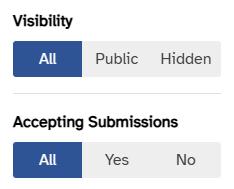
When a page needs more than one filter, extract them into a dedicated component (see src/pages/Admin/components/PublicationsFilterPanel.vue for the template). Conventions:
- Expose each filter via
defineModelso the parent owns state. - Export the default value (e.g.
defaultVisibility = "all") and its type so the parent can detect "no-op" state without duplicating string literals. - Prefer
q-btn-togglefor tri-state filters (true / false / either) — it can't reach an empty state and maps cleanly to a nullable server variable. - Use
q-menufrom a singleq-btntrigger to keep the table top bar compact.